


Storage in games with huge amounts of resource movement can be really tough, and the map of ‘Arknights Endfield‘ is laden with different kinds of resources. However, with the limited capacity of your backpack, there’s only so much you can carry at a time, which is a major issue.
The minerals & natural resources in ‘Arknights Endfield‘ are used to craft items for operators, which we control. So having more backpack space is essential. Let’s explore if players can expand their backpack space in the game.
How to Expand Backpack Space in ‘Arknights Endfield’?
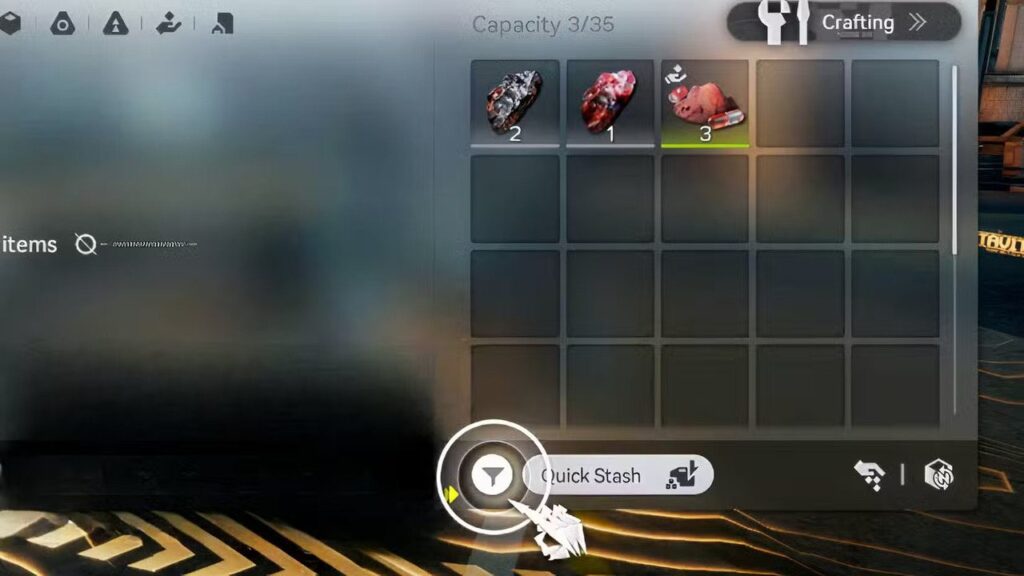
The game offers players a capacity of only 35 items to be stored in their backpacks. Moreover, this is the max capacity, and currently in Valley IV, Chapter 1, there’s no available way to increase this number. However, players can still utilize space in their Backpack better by using the Quick Stash feature.
The Quick Stash feature automatically moves your inventory items to the regional depot. However, to use this feature, you need to get access to the depot by just progressing a bit in the game. Below are the steps to use the Quick Stash feature in ‘Arknights Endfield‘:
- Go to a Tale-Protocol/TP Point and interact with it.
- You’ll see the “Manage Depot” button, click on it.
- You’ll now see the “Quick Stash” button, click it.
Related: Overwatch: Fika the Jetpack Cat Release Date and Abilities
Using the Quick Stash feature will move all your inventory items into the Depot, and you can use them in base building and automation. These Depots are shared inventory of your operators and have a capacity of 8,000, which can be increased to 11,000.
How To Go To TP Points in ‘Arknights Enfield‘?

Throughout the map of Talos-II, players can find many different and new locations and points of interest. One of the just points is TP or Tale-Protocol Points. These points become accessible during the Valley Reboot quest. To find TP Points on the map, players need to follow these steps:
- Click “Protosync” on the top-right side of your interface.
- Select Maps.
- Look for the TP Point icon.
- Hovering on it will give you the option to teleport, select that to travel instantly to the TP point.
In case you missed it: GTA 6 Marketing To Kick Off This Summer As Take-Two Boss Promises No More Delays
Not only can you use the TP Points to quickly stack your inventory, but they also save time as you can teleport to them from anywhere, which saves you time for any quest or mission that you might be doing.
